.jpg)
A Smarter, Simpler TownSq Community Homepage
We’ve redesigned the TownSq Community homepage to make finding what matters most effortless from the moment you log in. Residents, board members, and community managers now get a cleaner, more intuitive layout that surfaces the information they need—fast. No more digging for updates or hunting through menus. Whether you’re checking a payment, reading the latest announcement, or following up on a request, your essential to-dos are now easier to spot, understand, and act on.
Why This Update Matters
The previous homepage made it difficult to locate important information. Updates often got buried, navigation required extra clicks, and every user—regardless of role—saw the same generic view.
The new homepage fixes those pain points by:
- Making key information instantly accessible
Payments, documents, requests, and announcements are now front and center. - Personalizing the experience by role
Residents, managers, and board members each get a customized view with the tools they use most. - Simplifying navigation
Fewer clicks, less clutter, and a more intuitive flow make every interaction quicker and more reliable.
See it in action: Watch the video below to explore the streamlined layout and improved functionality.
Your New Homepage at a Glance
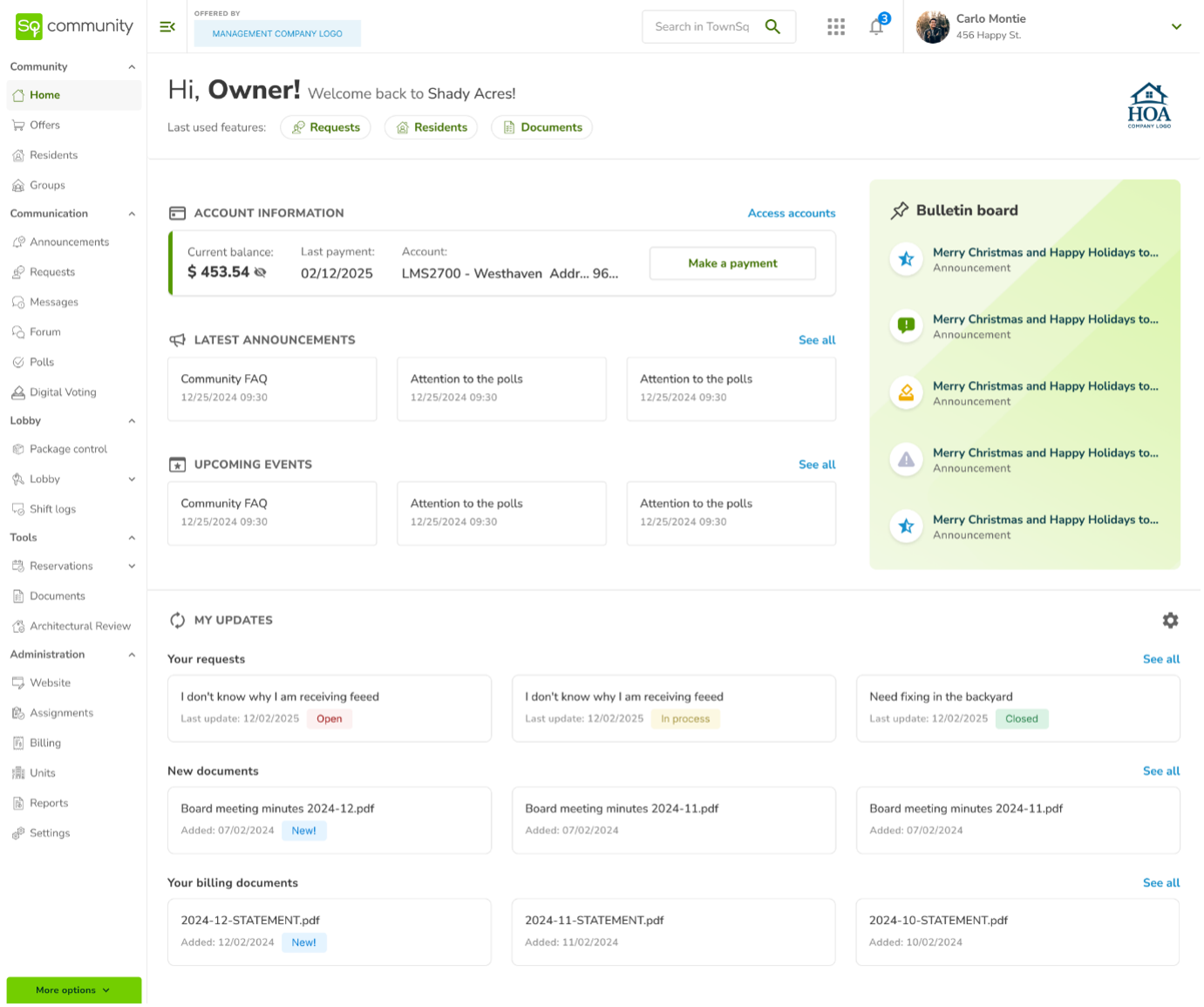
Personalized Header
See your name, recently used features, and—on mobile—a Global Search bar for instant access to what you need.
Account Information (Integrated Communities)
View your balance, review your last payment, or make a payment directly from the homepage.
Bulletin Board (Managers)
Pin up to five important items—Announcements, Documents, Events, Forum posts, or Surveys—so residents always see what’s most important.
Announcements & Events
Never miss what’s happening in your neighborhood. Key updates stay visible and simple to explore.
My Updates
A consolidated feed showing your latest requests, documents, billing items, packages, and reservations.
My To-Dos (Managers)
A centralized place to track pending requests, assignments, messages, and items that require follow-up.
Community Branding
Managers can upload a community logo to give the homepage a personalized, professional look.
Available Everywhere You Are
The redesigned homepage is now live on Web, iOS, and Android for a consistent and modern TownSq Community experience across every device.
What’s Next
We’re committed to continually refining the TownSq platform to make community living and community management simpler, clearer, and more connected. The refreshed homepage is just the start—more enhancements are on the way to bring even greater convenience, clarity, and engagement to your communities.