We're introducing a series of enhancements to Accounts & Payments designed to make it easier for residents and managers to understand account details, complete transactions with confidence, and stay on top of automatic billing.
These updates focus on improving clarity, visibility, and usability—while keeping all financial data and calculations exactly the same.
.png)
Why It Matters
Managing account balances and payments is one of the most important ways people interact with a community platform.
Residents need to quickly see what they owe, confirm payments were successful, and trust that information is accurate. In turn, managers benefit from fewer support requests and smoother financial oversight.
Previously, users had limited visibility into key statuses and account details. These updates build on the existing experience by making that information easier to find, understand, and manage—reducing uncertainty and improving overall confidence when completing transactions.
Now, users can expect:
- Clearer, more intuitive account information
- Greater transparency around recent activity and autopay
- Consistent balance information across platforms
- Better visibility into automatic payments
- More confidence when managing their accounts
What’s New
Here’s a look at the improved Accounts & Payments experience:
1. Improved Accounts Widget on Home
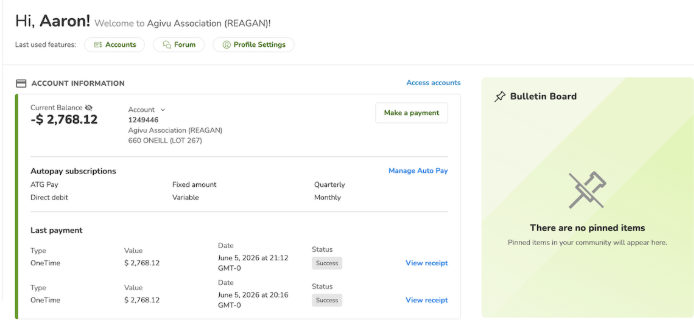
The Accounts widget on the home screen has been updated to provide a clearer and more consistent summary of key account information.
Users can quickly view their current balance, access recent activity, and navigate to payment actions more easily—all from one place.
This makes it faster to stay on top of account status without needing to navigate deeper into the platform.
2. Easier Access to Payment Actions
Payment-related actions are now easier to find and use.
Instead of navigating through a modal, users can now directly access:
- One-time payments
- Autopay settings
- Payment methods
This makes the transaction process faster and more intuitive.
3. New Last Payment Status
We’ve introduced a new Last payment section that shows the most recent electronic payment made within the platform, including access to a detailed receipt.
It provides real-time status updates, including:
- Processing
- Complete
- Failed
Users can also open a receipt modal to view details of their most recent payment.
This makes it easy to confirm the transaction is in progress—reducing uncertainty and preventing duplicates.
.png)
4. A Single, Consistent Balance
To improve trust and eliminate confusion, the current balance is now:
- Clearly displayed in a central location
- Fully consistent across applications, including the accounting system
This ensures users always see a single, accurate balance, no matter where they access TownSq.
5. Improved Autopay Visibility
Users can now view their automatic payments more clearly and in one place.
This includes:
- Autopay set up within TownSq
- Direct debit setups through the management company (when supported by TownSq Business Accounting)
This added visibility helps users better understand how and when their payments are processed.
6. Simplified Transaction History
The transaction list remains available, offering a cleaner, more streamlined experience.
Users can still browse their history using Load more and view transaction details.
7. Better Multi-Account Navigation
For users managing multiple properties:
- Accounts are organized in a clear, easy-to-navigate layout
- Switching between accounts updates information instantly
- Key actions stay visible and accessible
This makes managing multiple accounts more efficient and organized.
We’re continuously working to make community and financial management easier, more transparent, and more reliable.
These Accounts & Payments enhancements are another step toward giving residents and managers greater clarity, confidence, and control.